
You have the ability to create a unique account using your email address and a password to shop in Sphero’s web store online at www.sphero.com. By creating an account, you will be able to track your order history, make changes to your customer profile, and view your tax exempt status (if applicable)
Video instructions for creating an online account
How do I create a Sphero online account?
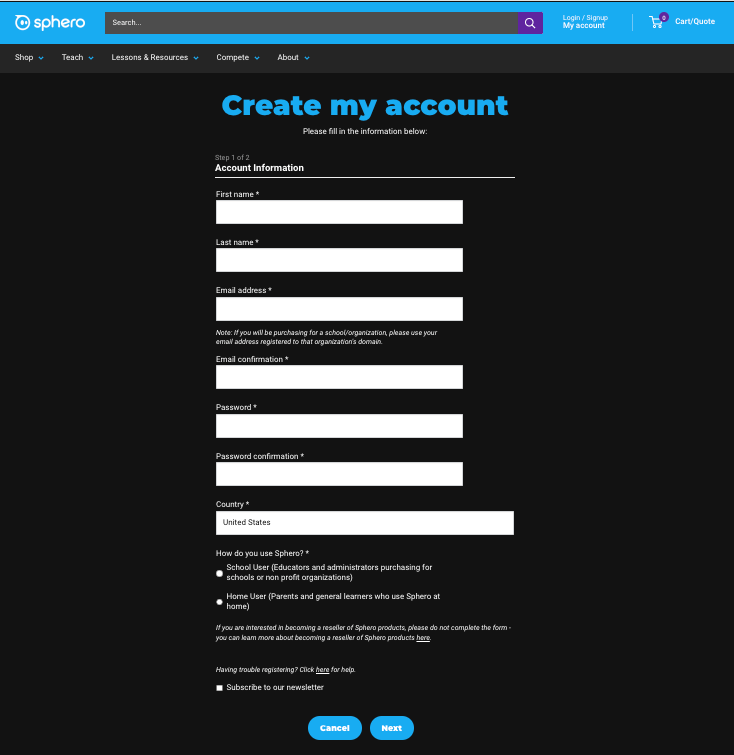
- Visit www.sphero.com and click My Account in the top right, or click the account icon (which option appears depends on your device and browser window size).
 OR

- Click Create your account.

- Enter your personal details. Select your account type:
- School User — for purchases in a school or organizational setting.
- Home User — for personal or home purchases outside a school or organization.

- If you selected Home User, click Create account to finish.
- If you selected School User, search for and select your school or organization from the list. One additional step is required to associate your account with an existing record in Sphero’s system.

- If your school or organization does not appear in the list, select School/Organization Not Found.

A new screen lets you enter your school or organization's details. You can also request that the organization be reviewed for tax exemption on this screen. If you mark the organization as tax exempt, upload a copy of the sales tax exemption certificate issued by your state. Sphero requires this certificate on file before granting tax-exempt status to your account. Once you have entered all required details, click Create account to complete your School User registration.
Note - this account is separate from your Sphero Edu and Classroom accounts.
What should I do if I have difficulties creating a Sphero account?
Sometimes, school internet security settings will prevent you from creating an account on sphero.com. You may see exhibited by a never-sending spinning wheel when trying to create an account. Please try the following to create your account:
- Create your account on your mobile device. Ensure you're using cellular data or a different WiFi network. The important thing is that you are not connected to your school's network.
- Clear your cookies and cache on your internet browser.
If you are still having difficulties, contact us here and a member of our team will be happy to help.