
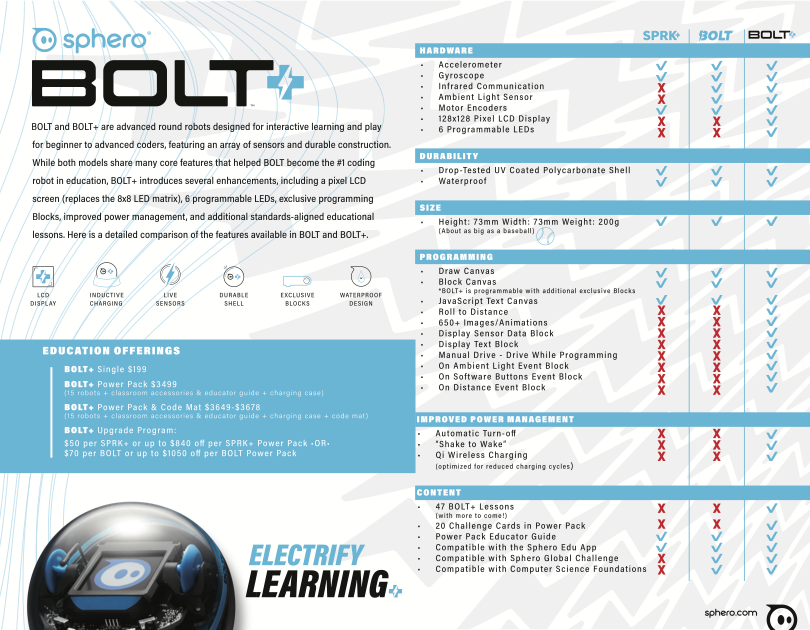
What is Sphero BOLT+? BOLT+ vs. BOLT Comparison
BOLT+ (Sphero BOLT+) is an upgraded version of the Sphero BOLT robot, adding meaningful enhancements in display, power, connectivity, and programming while retaining full backward compatibility with original Sphero BOLT lessons.
BOLT+ is compatible with iOS, Android, Chromebook, and Mac devices running the Sphero Edu app.
Key Upgrades
LCD Screen
-
Higher-resolution 128x128 pixel display replaces the original matrix.
-
Access hundreds of images and animations via the block programming canvas.
-
Students can “star” favorites for repeated use and display real-time sensor data.
New Programming Blocks
-
Roll to Distance: Move BOLT+ a defined distance.
-
Drive Block: Toggle manual driving while a program runs.
-
Ambient Light Sensor Event: Respond to light changes.
-
Distance Sensor Event: Trigger actions at a specific distance.
-
Time Elapsed Event: Trigger actions after a set time.
-
Display Blocks: Print text, show live sensor data, and display images/animations.
-
Button Event: Use buttons to trigger program actions.
Drive While Programming
-
Students can drive Sphero BOLT+ while running programs — enabling engaging activities like navigating mazes, responding to environmental sensors, or tracking collisions during games. This feature is activated using the Drive Block in the programming canvas.
Improved Power Management
-
Shake to Wake: Inactive robots turn off; shake to reactivate.
-
Qi Wireless Charging: Charges wirelessly via any Qi-compatible charging pad; automatically stops when the battery is full.
-
Improved Battery Life: A full charge lasts an entire school day (typically 6–8 hours), and optimized charging cycles extend the overall battery lifespan.
Classroom Management Features
-
Robot ID displays on the screen for easier identification.
-
Auto-reconnects to the last robot seen within 5 minutes, reducing accidental disconnections.
New Content and Learning Resources
-
Fully backwards compatible with all BOLT lessons (matrix emulator available on LCD).
-
Challenge Cards are included with the BOLT+ Power Pack to guide educators and scaffold learning for new users. (Check the current product listing for the most up-to-date count.) Additional BOLT+ activities and lesson plans are available in the Sphero Edu app and at edu.sphero.com.
BOLT+ offers a more versatile and interactive experience for both students and educators while retaining compatibility with existing BOLT lessons.